
 Updated
If you want to trade Coffee-C on MT4 or MT5, the first step is not placing an order. It is finding the product, checking the live conditions (current price, spread, and market status), and setting your risk controls (stop-loss, lot size, and limits on how much you can lose or how much you can trade).
This guide shows how to find Coffee-C, open its chart, review costs, place orders, and practice trading it on a demo account before trading live.
For broader market education, see our coffee CFD trading guide.
Coffee-C trading on MT4 and MT5 means using your trading platform to trade Coffee Arabica price movements, aiming to profit from price movements through CFD without owning the underlying asset.
Key Takeaways
- Trading starts with product checks, not order placement. Traders should first confirm Coffee-C availability, live pricing, spreads, market status, and trading hours.
- Coffee-C is a leveraged CFD, not physical coffee. Traders only gain exposure to Arabica coffee price changes. They can trade rising or falling prices without owning the commodity.
- Trading costs can affect results. Spreads, overnight swap fees, margin needs, slippage, and position size can reduce profits or increase losses.
- MT4 and MT5 follow similar trading steps but offer different tools. MT4 suits simpler trading needs. MT5 provides more time frames, indicators, chart tools, and order types.
- Risk control is central to the whole process. Traders should choose suitable lot sizes, set stop-loss and take-profit levels, and practise on a demo account before using real funds. Demo success does not guarantee live results.
Before placing a trade, check whether Coffee-C is available on your account, then review spread, swap, margin, trading hours, lot size, and stop-loss settings.
What Is Coffee-C on Vantage?
Coffee-C is Vantage’s Coffee Arabica CFD. As a trader, you can trade coffee price movements without buying, storing, or taking delivery of physical coffee.
Because Coffee-C is a CFD, traders can speculate (to try to make a profit by guessing price movements) on both rising and falling prices. However, CFD trading also involves risks.
It is important to remember that trading Coffee-C does not mean owning coffee as a commodity. Instead, you are trading a contract based on price movement. However, product specifications may change over time. So before opening a position, check the live platform for current trading conditions, including spreads, margin requirements, swap rates, and market availability (whether the product is available to trade).

Why Use MT4 or MT5 for Coffee-C Trading?
Both MT4 and MT5 allow traders to monitor markets, analyse charts, place orders, and manage open positions (look after trades you already opened) on desktop and mobile devices.
Many traders choose MT4 for its straightforward trading experience. It has simple, easy-to-understand charting tools, easy order management, and built-in features such as indicators (e.g., moving averages) and drawing tools (e.g., trend lines and support/resistance levels).
MT5 includes additional charting tools, more time frames, and extra order functionality for traders who want greater flexibility. For example, MT5 offers more built-in technical indicators, more chart time frames, and pending order types like buy and sell at different price levels.
| Platform | Best For | Coffee-C Use Case |
| MT4 | Simple CFD workflow | Basic charting, orders, stop loss, take profit, and common indicators |
| MT5 | More detailed chart planning | More time frames, indicators, and order options |
| Mobile App | Monitoring trades | Alerts, account checks, and position monitoring |
Whether you choose to trade coffee on MT4 or MT5, the workflow remains largely the same. But you should choose a platform that matches your trading style and analysis needs. For instance, if you use many indicators and charting tools, MT5 may suit you better. If you prefer a simpler platform, MT4 may be enough.
How to Find Coffee-C on MT4 or MT5
It is straightforward to find Coffee-C trading products on WebTrader, MT4, or MT5. Let’s use the Vantage WebTrader for this demonstration. So these are the steps you follow:
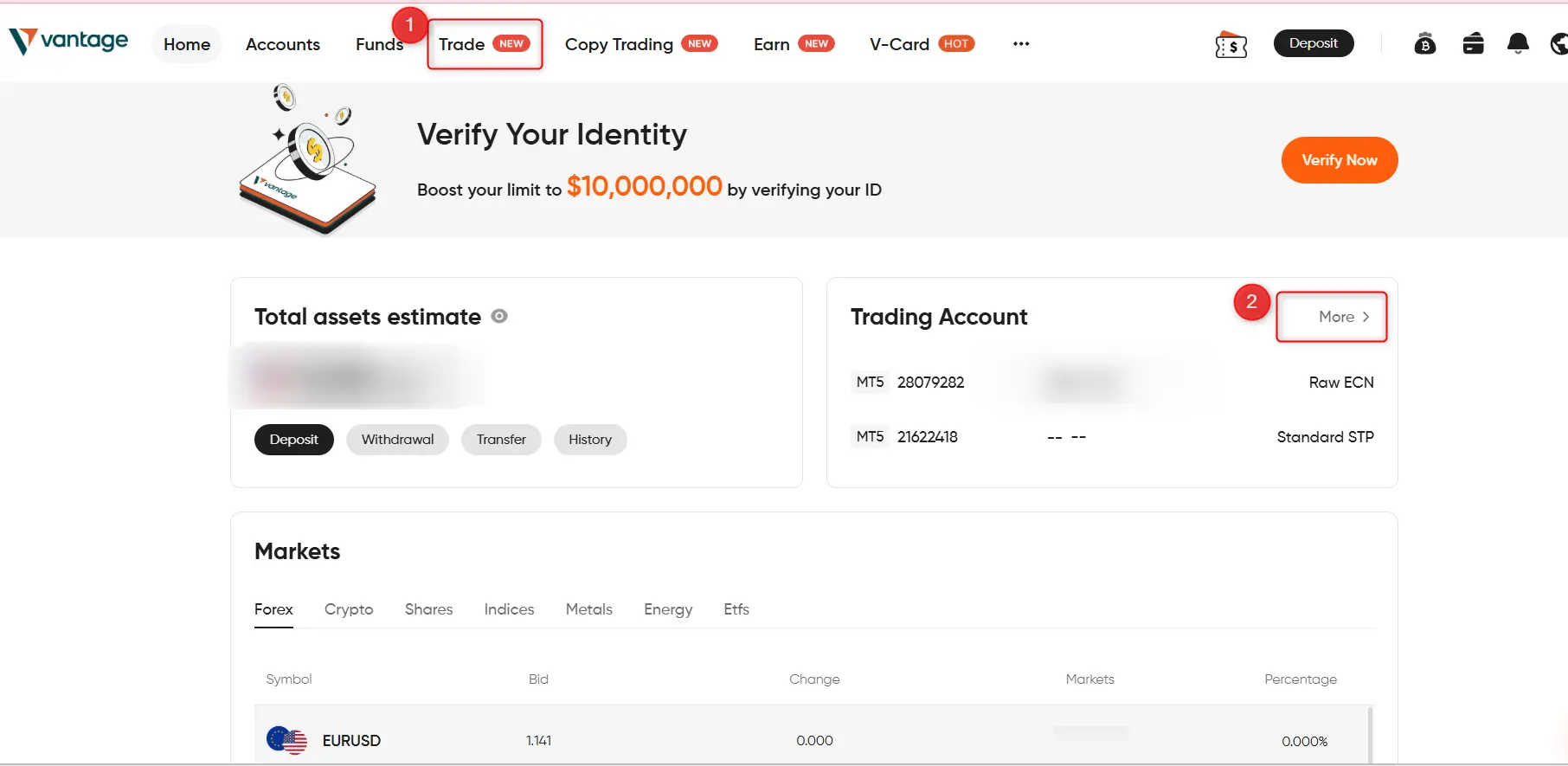
1. Log in to your WebTrader and select MT5
After logging in, select MT5 and click on Trade in the top menu bar labelled “1”
2. Search for Coffee-C
Two ways to do this easily. In the web trading terminal on your screen, you can type “Coffee-C” directly into the instrument search bar labelled “1”, or click the small navigation arrow labelled “2” to reveal the commodity category.
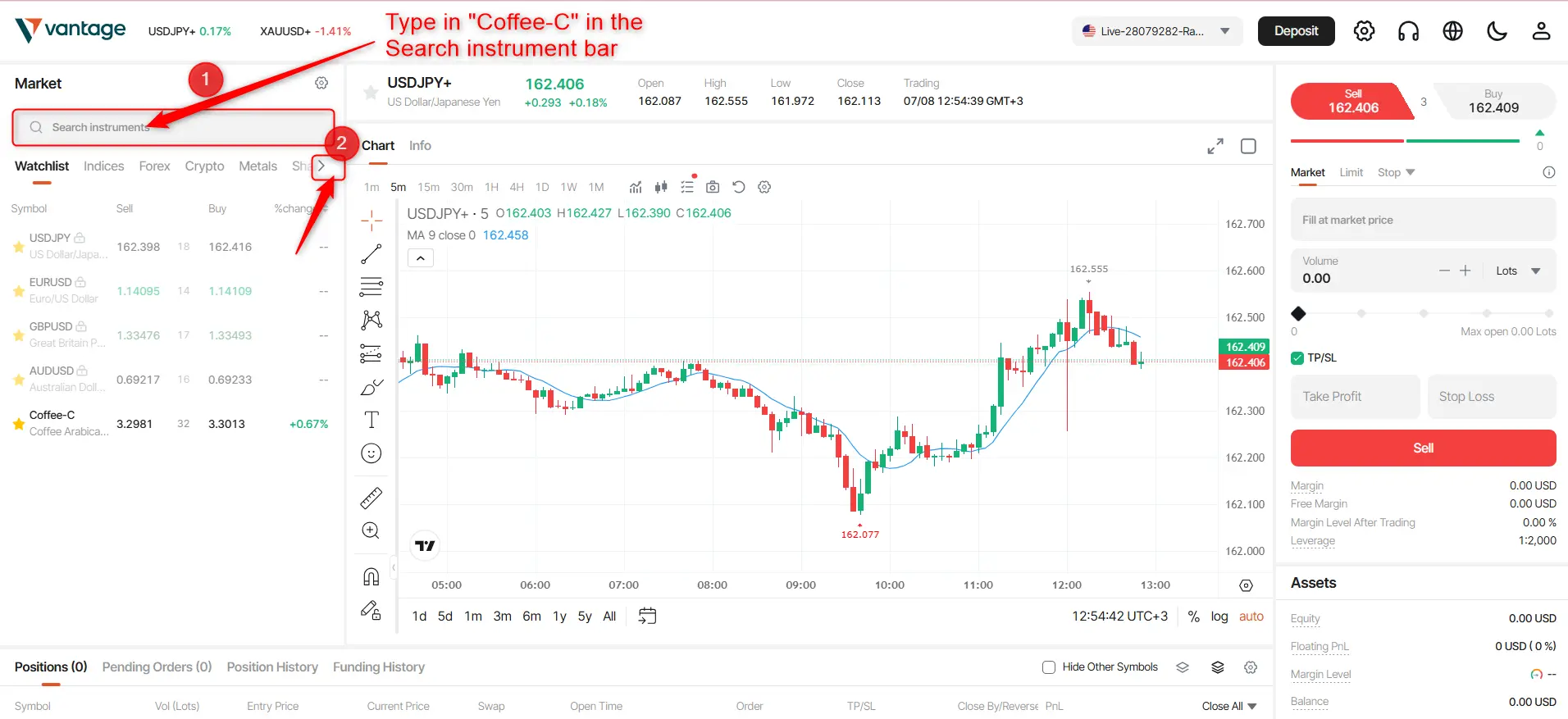
3. Type Coffee-C in the “Search instrument bar”
Browse the soft commodities category, or use the search bar to find Coffee-C.
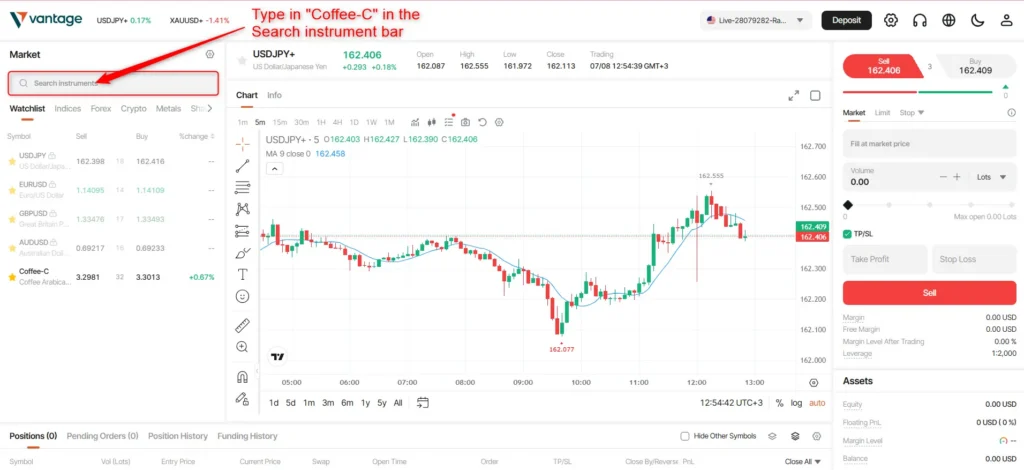
4. Click on the instrument to view the Coffee-C chart
When Coffee-C appears, select the product. Open a chart and check whether pricing is active and whether the market is open.
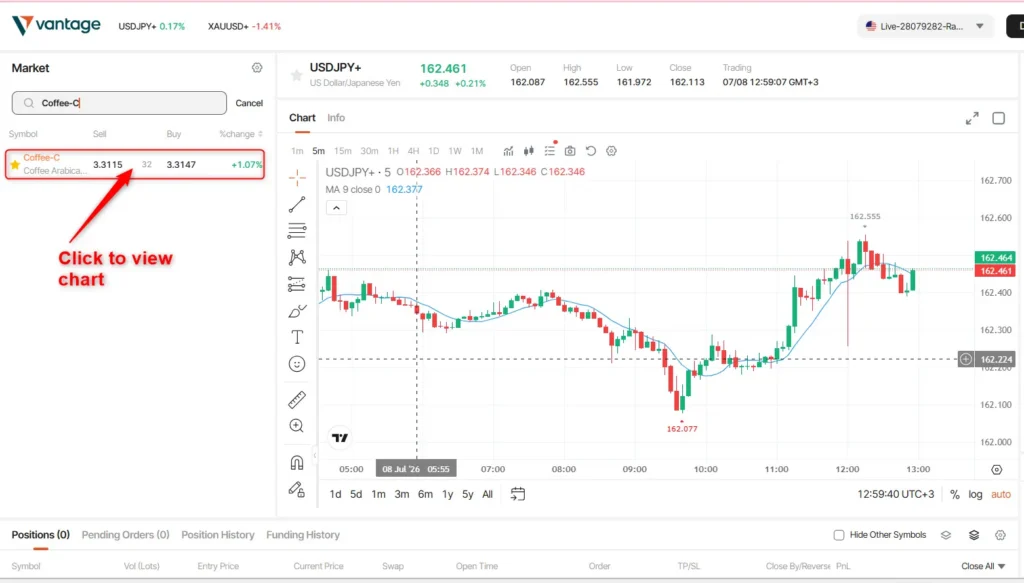
Before trading, review: bid price, ask price, spread, market status, trading availability
You should review them to better understand pricing, trading costs, market availability, and other trading conditions before placing a trade.
Keep in mind that symbol availability (whether the product appears on your trading platform) may vary by account type, server configuration, platform setup, and regional availability.
If you cannot find Coffee-C, check your account specifications or contact support for assistance.
What to Check Before Placing a Coffee-C Trade
Before entering any position, review the live trading conditions.
| Check | What It Means | Why It Matters |
| Spread | Difference between the buy and sell price | Affects trading costs |
| Swap | Potential overnight charge or credit | Affects longer-term positions |
| Margin | Capital required to open a trade | Influences account exposure |
| Lot Size | Position size selected | Larger positions increase risk |
| Trading Hours | When the market is available | Trading may not be available outside market hours |
| Market Status | Whether pricing is active | Helps avoid inactive pricing periods |
Before You Trade Checklist
- Confirm Coffee-C is available on your account.
- Check the current spread so you know how much you spend on a trade.
- Review any overnight swap charges.
- Verify margin requirements.
- Select an appropriate lot size.
- Confirm the market is open.
- Set stop-loss and take-profit levels if appropriate.
Risk Note
You should know that CFD trading carries risk, and leverage can increase both profits and losses. So do not just place trades; always verify live spread, swap, margin, trading hours, lot size, and market status first.
How to Read the Coffee-C Chart
You use a Coffee-C chart to review recent price movements before starting a trade.
To understand the broader market direction, start with a higher time frame, a longer period, such as the daily or four-hour chart. Then move to shorter time frames if you need a more detailed view of recent price activity.
Common tools you can use to read Coffee-C charts:
- Candlestick charts, which show how price moved up and down over time
- Support levels, which show price areas where it tends to stop falling
- Resistance levels, which show price areas where it tends to stop rising
- Moving averages, which are a smoothed line that shows the average price over time
- Price alerts, which are notifications when the price reaches a set level
These tools can help organise trade planning. They do not predict future market movements, and no chart pattern guarantees a particular outcome.
The purpose of chart analysis is to prepare for possible market scenarios before placing an order. For example, if Coffee-C is trading near a support level, some traders monitor whether the price holds above that level or breaks below it as part of their market analysis. Different traders may interpret the same price action differently, and no outcome is guaranteed.
How to Place a Coffee-C Order on MT4 or MT5
Once you have reviewed market conditions, such as spreads and margins, and confirmed that Coffee-C is available to trade, you can place an order.
Follow these steps:
- Open the Coffee-C chart
- Click “New Order.”
- Choose a market order or pending order(pick a trade that opens immediately or one that opens later at a set price)
- Enter your lot size
- Add a stop loss, which means setting a limit if the trade goes against you
- Set a target price at which the trade will close in profit
- Review spread and margin requirements
- Confirm the order
- Monitor the position after entry
Order Types Explained
| Order Tool | What It Does |
| Market Order | Opens a position at the current available market price |
| Pending Order | Opens a position only when the price reaches a chosen level |
| Stop Loss | Helps limit losses, although execution may vary during fast markets |
| Take Profit | Closes a position at a selected profit target if reached |
Before submitting any order, ensure that the position size (how big your trade is, or how much you buy or sell) and risk exposure (how much money you can lose on that trade) align with your trading plan.
MT4 vs MT5 for Coffee-C Trading
Both platforms can be used as CFD coffee platforms, but they offer different features.
| Feature | MT4 | MT5 |
| Time Frames | 9 | 21 |
| Built-in Indicators | 30 | 38 |
| Charting Tools | 31 | 44 |
| Order Types | 4 | 6 |
| Best Fit | Simple CFD workflow | More detailed planning |
Neither platform is automatically better. If you like simple charts and basic trading, MT4 works. If you want more tools and more order types for detailed analysis and trade control, MT5 may suit you better.
How to Practice Coffee-C Trading With a Demo Account
You can practice trading Coffee-C on a demo account without risking real money. Once you are comfortable using the platform, you may choose to move to a live account.
How you can practice trading Coffee-C on a demo account:
- Find Coffee-C in Market Watch
- Open the chart
- Review spread and margin: check trading cost and money needed to open the trade.
- Place market orders to buy or sell immediately at the current price
- Place pending orders, which entails setting a trade to open later at a chosen price
- Adjust lot sizes, meaning you choose how big your trade is. Adding stop losses means you set a level to limit losses
- Add take-profit levels, which means setting a level to lock in profit
- Monitor positions, meaning you watch your open trades and manage them
Demo trading helps you familiarise yourself with trading on a platform and how it functions before real capital is involved.
Open a demo account and practice finding Coffee-C, checking live conditions (price, spread, market open status, and margin), placing orders, and setting risk controls before trading with real funds.
Common Mistakes to Avoid
Many trading mistakes occur before the order is placed.
| Mistake | Why It Matters |
| Trading without checking the spread | Costs may reduce your profits and even increase losses without you knowing |
| Ignoring swap charges | Overnight costs may accumulate |
| Using large lot sizes or placing big trades | Risk increases as position size grows, which means bigger trades mean bigger risk |
| Trading without a stop loss(a limit on how much you can lose) | Losses can become larger than planned |
| Trading when pricing is inactive | Market conditions may not support normal execution, or trades might not go through |
| Treating demo results as guaranteed | Live trading introduces real emotions and market conditions |
Conclusion
How to trade Coffee-C on MT4 and MT5 starts with accessing the platform to review spreads, swaps, margin requirements, lot size, trading hours, and stop-loss settings. To know the cost, risk, and rules before you place the trade. Then consider practising on a demo account before trading with real funds.
A demo account provides an opportunity to practice trading on the platform before risking real capital. Once you are familiar with the platform and the product, you may decide whether live trading is appropriate for your circumstances.
Frequently Asked Questions
Can I trade Coffee-C on MT4?
Yes. You can trade Coffee-C on MT4 if Coffee-C is available on your account. To verify it is available for trade, open Market Watch, search for the symbol, and review the live product conditions before placing a trade.
Can I trade Coffee-C on MT5?
Yes. You can trade coffee on MT5 if the product is available on your account.
Is Coffee-C the same as physical coffee?
No. Coffee-C is a CFD product. You trade coffee price movements without physical ownership or delivery.
What should I check before trading Coffee-C?
Review spread, swap, margin requirements, lot size, trading hours, and market status before opening a position to better understand the applicable trading conditions.
Why can’t I see Coffee-C in Market Watch?
Product availability may vary by account type, platform server, and region. If you open Market Watch, select Symbols or Show All, and Coffee-C is available on your account, then contact support.
Is MT4 or MT5 better for Coffee-C?
MT4 is generally simpler, while MT5 offers more charting and order-management features. The better option depends on your trading requirements. MT4 is simpler with basic tools, while MT5 has more tools, more order options, and deeper control for traders who want more detail.
Should beginners trade Coffee-C live?
For a new trader, do not trade live at the start; practice on a demo account first. Coffee CFDs involve risk, and leverage can increase both gains and losses.
Risk Warning: CFDs are complex financial instruments and carry a high risk of rapid loss of money due to leverage. You should ensure you fully understand the risks involved and carefully consider whether you can afford to take the high risk of losing your money before trading.
Disclaimer: The information is provided for educational purposes only and doesn’t take into account your personal objectives, financial circumstances, or needs. It does not constitute investment advice. We encourage you to seek independent advice if necessary. No representation or warranty is given as to the accuracy or completeness of any information contained within.
This material may contain historical or past-performance figures and should not be relied upon. Furthermore, estimates, forward-looking statements, and forecasts cannot be guaranteed. The information on this site and the products and services offered are not intended for distribution to any person in any country or jurisdiction where such distribution or use would be contrary to local law or regulation.
References
- CME Group: Commodity Futures Education https://www.cmegroup.com/education.html
- MetaTrader 4 Official Site https://www.metatrader4.com/en
- MetaTrader 5 Official Site https://www.metatrader5.com/en