Register
 Login
Login Register


MetaTrader 4, also known as MT4, is one of the world’s most widely used trading platforms for forex and CFD trading. It is popular with both beginners and experienced traders because it combines live price charts, technical indicators, order execution, and trade management tools in one platform.
This guide explains what MT4 is, how it works, and how to start using it step by step. It also covers key features, common uses, and practical tips to help new users understand the platform more confidently.
Key Takeaways
- MetaTrader 4 is one of the most widely used platforms for forex and CFD trading.
- MT4 helps traders analyse charts, place trades, and manage positions from one interface.
- The platform is beginner-friendly, but still offers advanced tools such as custom indicators and Expert Advisors.
- Understanding the MT4 layout is the first step to using it effectively.
- Traders can use MT4 to set stop-loss and take-profit orders for better risk management.
- Depending on broker offering, MT4 may support forex, indices, commodities, and other CFD products.
- A demo account is a useful way to learn how MT4 works before trading live.
What is MetaTrader 4 (MT4)
MetaTrader 4 is an electronic trading platform developed for traders who want to analyse financial markets and place trades through a single interface. It is especially well known in forex and CFD trading, where users need access to live pricing, charting tools, order execution, and basic account management.
MT4 remains popular because it offers a practical balance between simplicity and functionality. Beginners often find it easier to learn than more complex platforms, while experienced traders continue to use it for its custom indicators, charting features, and automated trading support.
The platform can typically be accessed on desktop, mobile, and sometimes browser-based versions, depending on broker offering. This flexibility makes it easier for traders to check markets, monitor positions, and manage trades from different devices.
Key Points About MT4
| Feature | What It Means for Users |
| Real-time charts | Monitor live market price movements |
| Technical indicators | Analyse trends, momentum, and volatility |
| One-click trading | Enter and exit trades faster |
| Multiple order types | Place market orders and pending orders |
| Expert Advisors | Automate trading strategies |
| Cross-device access | Trade on desktop, web, and mobile |
Why Do Traders Use MT4?
Traders use MT4 because it offers a balance of simplicity and functionality. It is easy enough for beginners to learn, but also flexible enough for advanced traders who want more control over charting, indicators, and automation.
Common reasons traders choose MT4 include:
- User-friendly interface
- Fast trade execution
- Access to charting and analysis tools
- Support for custom indicators
- Ability to use Expert Advisors for automation
- Availability across desktop and mobile devices
What Can You Trade on MT4?
Depending on your broker, MT4 can be used to trade different CFD markets, such as:
This makes MT4 useful for traders who want to access different global markets from one platform.
Main Features of MT4
1. Advanced Charting Tools
MT4 provides interactive price charts that allow users to monitor market movements across multiple timeframes. Traders can switch between chart styles, apply technical indicators, and draw support and resistance levels directly on the chart.
2. Technical Indicators
MT4 includes built-in indicators such as moving averages, MACD, RSI, Bollinger Bands, and more. These tools help traders identify trends, momentum, volatility, and possible entry or exit points.
3. Order Management
Users can place market orders, stop orders, and limit orders directly from the platform. MT4 also allows traders to set stop-loss and take-profit levels to manage risk more effectively.
4. Expert Advisors
Expert Advisors, often called EAs, are automated trading programs that can monitor markets and execute trades based on predefined rules. This is one of MT4’s most recognisable features.
5. Market Monitoring
The Market Watch panel lets users track live bid and ask prices for available instruments, making it easier to follow multiple markets at the same time.
Pros and Cons of MT4
| Pros | Cons |
| Easy for beginners to navigate | Older platform compared with MT5 |
| Widely supported by brokers | Fewer built-in tools than MT5 |
| Strong charting and indicator support | More focused on forex and CFDs |
| Supports automated trading | Interface may look dated to some users |
| Available on desktop and mobile | Some advanced asset classes may be limited depending on broker |
MT4 vs MT5: What’s the Difference?
Many beginners confuse MT4 and MT5, so including a quick comparison helps answer a common search intent noted in the audit.
| Feature | MT4 | MT5 |
| Best known for | Forex and CFD trading | Multi-asset trading |
| Ease of use | Simpler for beginners | Slightly more advanced |
| Built-in indicators | Strong selection | More built-in tools |
| Timeframes | Fewer | More |
| Economic calendar | No native built-in calendar | Yes |
| Suitable for | Users who want a familiar, focused platform | Users who want broader platform features |
Read more about the difference between mt4 and mt5 here.
How to Use MetaTrader 4
MetaTrader 4 can seem technical at first, but the platform becomes easier to use once you understand the basic workflow. In simple terms, most users will go through the same process: download the platform, log in, explore the interface, open a chart, place a trade, and manage risk.
Below is a beginner-friendly step-by-step guide.
Step 1: Download MT4
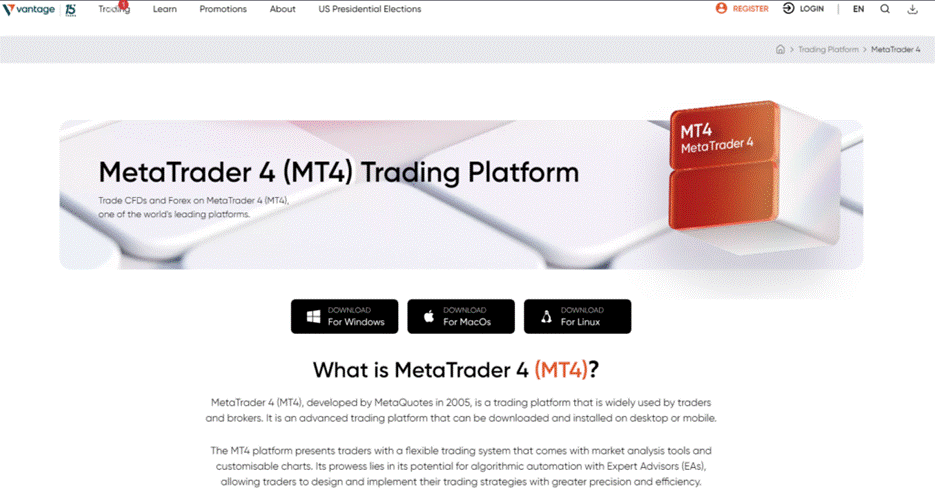
The first step is to download MetaTrader 4 on your preferred device. MT4 is usually available on:
- Windows desktop
- Mac via compatible setup or broker-supported method
- iPhone and iPad
- Android devices
- WebTrader via browser, depending on broker availability
When downloading MT4, always use your broker’s official download page to make sure you get the correct server configuration and platform version.
Step 2: Log In to Your Trading Account
Once MT4 is installed, log in using your account credentials. You will usually need:
- Login ID
- Password
- Server name
If you are new to trading, it is best to start with a demo account before using a live account. A demo account lets you explore the platform and practise placing trades without risking real money.
Step 3: Understand the MT4 Interface
Before trading, it helps to get familiar with the main sections of the platform.
| Section | What It Does |
| Market Watch | Shows live prices for available instruments |
| Navigator | Gives access to accounts, indicators, EAs, and scripts |
| Chart Window | Displays price movement of selected instruments |
| Toolbar | Provides shortcuts for chart settings and order actions |
| Terminal | Shows trade history, open positions, balance, and alerts |
Step 4: Open a Price Chart
To begin analysing a market, open a chart for the instrument you want to trade.
How to open a chart:
- Go to the Market Watch panel
- Right-click the instrument
- Select Chart Window
Once the chart opens, you can customise it by changing:
- Timeframe
- Chart type
- Colour theme
- Indicators
- Drawing tools
Step 5: Add Indicators and Timeframes
Indicators help traders interpret price action. MT4 includes a range of built-in indicators for trend, momentum, and volatility analysis.
Some commonly used indicators include:
- Moving Average
- RSI
- MACD
- Bollinger Bands
You can also switch between timeframes such as:
- M1
- M5
- M15
- H1
- H4
- D1
Beginners should avoid using too many indicators at once. A cleaner chart is usually easier to read.
Step 6: Place Your First Trade
To place a trade in MT4:
- Select the instrument you want to trade
- Analyse the market and consider your risk management and trading plans
- Click New Order
- Enter your trade size
- Choose whether to buy or sell
- Set your stop-loss and take-profit levels
- Confirm the order
What each field means
| Field | Meaning |
| Symbol | The instrument you want to trade |
| Volume | The trade size |
| Stop Loss | The price level where your loss is limited |
| Take Profit | The price level where profits are locked in |
| Type | Market execution or pending order |
Step 7: Monitor and Manage Your Trade
Once your trade is open, you can monitor it in the Terminal window. Here you can see:
- Open positions
- Entry price
- Current profit or loss
- Stop-loss and take-profit levels
- Account balance and equity
You can also modify an open trade by adjusting your stop-loss or take-profit if you decide this is appropriate for you.
Step 8: Manage Risk on MT4
Risk management is essential when using MT4. The platform provides several tools that can help traders manage exposure more carefully.
Basic risk management tools in MT4
| Tool | How It Helps |
| Stop-loss | Can limit downside if the market moves against you |
| Take-profit | Can lock in gains automatically at a chosen level |
| Position sizing | Can help control how much capital is risked per trade |
| Pending orders | May allow planned entries instead of emotional entries |
| Trade history | May help review past performance and decision-making |
Practical tips for beginners
- Start with a demo account
- Use stop-loss orders on every trade
- Keep position sizes small
- Avoid overtrading
- Review charts before entering a position
- Understand the instrument before trading it
Step 9: Use MT4 on Mobile
MT4 mobile apps allow users to:
- Check charts on the go
- Monitor positions
- Open and close trades
- View account history
Mobile trading is convenient, but many users still prefer the desktop version for deeper analysis because the charting area is larger and easier to work with.
Quick Summary: How to Start Using MT4
| Step | Action |
| 1 | Download MT4 |
| 2 | Log in to your account |
| 3 | Learn the platform layout |
| 4 | Open a chart |
| 5 | Add indicators and select timeframe |
| 6 | Analyse the market and consider your trading plan and risk management strategy |
| 7 | Place a trade |
| 8 | Monitor your position |
| 9 | Manage risk with stop-loss and sizing |
Frequently Asked Questions (FAQs)
Is MetaTrader 4 good for beginners?
Yes, MT4 is considered beginner-friendly because the platform is relatively easy to navigate and offers essential trading tools in one place. Beginners can start with a demo account to learn how charts, indicators, and order execution work before moving to live trading.
Is MetaTrader 4 free to use?
MT4 itself is generally free to download and install. However, trading on MT4 may involve spreads, commissions, overnight financing charges, or other fees depending on the broker and market you trade.
What is the difference between MT4 and MT5?
MT4 is mainly associated with forex and CFD trading and is known for its simplicity. MT5 offers a broader set of built-in tools and more market functionality, but some traders still prefer MT4 for its familiarity and streamlined experience.
Can I trade indices on MT4?
Yes, if your broker offers index CFDs on MT4, you can trade indices on the platform in a similar way to forex pairs. You can open charts, apply indicators, and place buy or sell orders from the order window.
How do I manage risk on MT4?
You can manage risk on MT4 by using stop-loss orders, take-profit levels, smaller position sizes, and a clear trading plan and risk management strategy. Reviewing open trades in the Terminal window can also help you monitor exposure.
Can I use MT4 on my phone?
Yes, MT4 is available on both iOS and Android. The mobile app allows you to monitor markets, review charts, and manage positions while away from your desktop.
Do I need a demo account before using MT4 live?
A demo account is not required, but it is strongly recommended for beginners. It allows you to practise using the platform and understand the functionality of MT4 prior to trading real funds.